
© 2025 MarME — Marco’s Measurement Equipment
Background
When I bought my HP 8591E spectrum analyzer it came with a warning:It works — but only if you leave Option 130 (the narrow-bandwidth IF) disconnected. Oh and it has a strange glitch in the amplitude – as the previous owner told me.
That The Option 130 board was in a separate shielded bag because the previous owner couldn’t get the unit to pass self-tests with it installed. That made the analyzer an interesting challenge.
Initial condition
With the Option 130 removed, the analyzer powered up and basically worked,
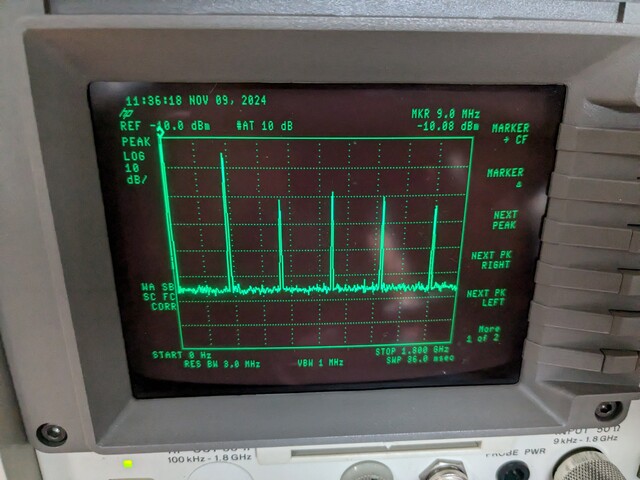
but the baseline showed a noise hump of about –9 dB around the reference level.
Amplitude calibration (Cal > Correct) changed that noise,
which made me doubt he calibration constants.
Frequency and amplitude self-calibration partly succeeded,
but the resolution-bandwidth shape test failed for the 30 kHz and 10 kHz filters.
After reinstalling the Option 130, the display went completely flat at –140 dBm — no signal at all.
Tracking down the obvious faults
It turned out that one of the two jumpers on the Option 130 PCB was missing;
it had been borrowed to jump a link in the analyzer that needs to be installed when the option is removed.
Replacing that jumper brought the analyzer with opt 130 back to life — a good first win.
However, calibration still failed, at NBW 200 Hz Notch,
and amplitude calibration showed wildly incorrect gain steps.
At this point I began to suspect front-end damage.
Burned input attenuator
Checking the built-in 300 MHz calibration signal through the internal attenuator
showed nonsensical results:
the 20 dB step actually increased the signal level.
At some settings the analyzer’s own 10 dB and 20 dB steps produced reversed behavior.
Removing the attenuator confirmed the cause —
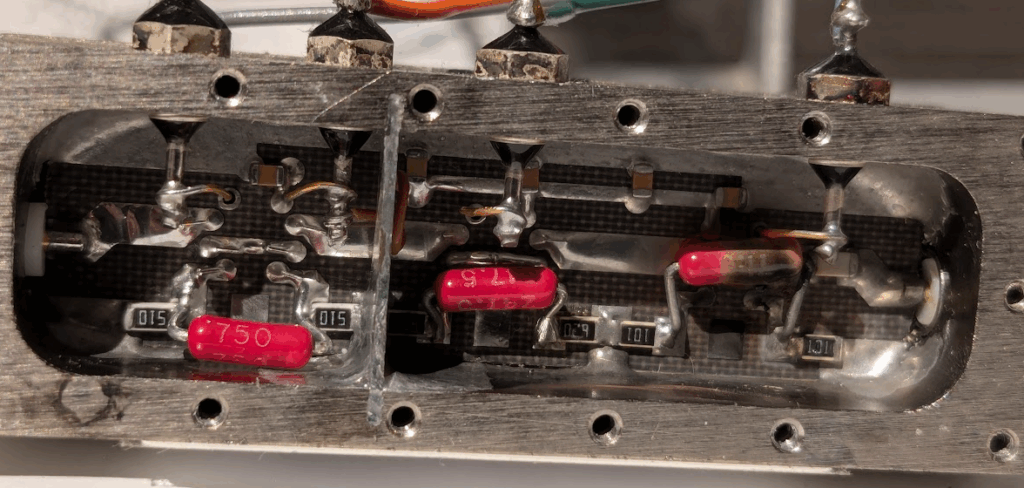
a burned JFW 50P-1120 RF attenuator, likely overloaded in the past.
Using a NanoVNA I measured the individual pads:
10 dB pad ≈ –15 dB   (instead of –10 dB)
20 dB pad ≈ –15 dB   (instead of –20 dB)
30 dB pad ≈ –30 dB   (OK)
Clearly, the 10 dB and 20 dB sections were toast. Upon opening the dark scars where clearly visible in the attenuator.
Rebuilding the attenuator
With help from Yves Tardif on the HP/Agilent/Keysight Equipment group,
I disassembled the attenuator and replaced both SMD and through-hole resistors
with thin-film precision parts.
After some tuning, a LiteVNA sweep showed the fixed device within about 0.5 dB of nominal up to 1.8 GHz — more than good enough to continue testing if this was the only issue.
For higher-frequency versions of the 859x-series, more care may be required because parasitic capacitances become significant.
| Setting | 300 MHz | 600 MHz | 900 MHz | 1.2 GHz | 1.5 GHz | 1.8 GHz |
|---|---|---|---|---|---|---|
| 10 dB | –10.5 | –10.8 | –11.0 | –11.0 | –10.7 | –10.0 |
| 20 dB | –21.0 | –21.2 | –21.3 | –21.3 | –21.5 | –21.6 |
| 30 dB | –30.8 | –30.7 | –30.4 | –30.2 | –30.0 | –30.0 |
After reinstalling it, self-calibration and confidence tests finally passed.
Lin/Log amplifier misadjustment
Even with the attenuator fixed, amplitude linearity was still off by several dB.
The root cause turned out not to be damaged mixer diodes, as initially feared,
but the misadjusted trimmers on the lin/log amplifier module.
Once those potentiometers were realigned, the analyzer’s logarithmic and linear
amplitude modes agreed again and the overall calibration behaved normally.
Calibration and results
After these repairs:
- Self Cal and Confidence Test both passed without errors.
- The internal 300 MHz calibration signal appeared at –20 dBm ±1 dB, stable across spans.
- The Option 130 filters (30 Hz–300 Hz) produced correct shape factors.
Lessons learned
- Never trust a “working except…” listing on used test equipment.
- The 8591E attenuator can often be rebuilt with ordinary precision resistors,
but higher-frequency variants may require RF-rated parts and careful layout. - The lin/log amplifier adjustments have a major impact on amplitude accuracy;
they’re worth checking before suspecting mixer damage. - Community knowledge — such as the HP / Agilent / Keysight Equipment groups.io forum — is invaluable for complex restorations.
Leave a Reply